

Leedz How-To
Topics:
• Choose Your Trades • Buy a Leed • Share a Leed • Get Paid with Square • Your Account • Edit a Leed • Report a Leed • Privacy & Security • For Agents • Contact the LeedzChoose Your Trades
The Leedz shows you leedz posted for the trades you subscribe to. Your subscriptions determine which opportunities appear in your Find Leedz results on the dashboard. There are several ways to subscribe:
- Dashboard: Edit your User Profile on the dashboard to add or remove trade subscriptions.
- Email: Send an email to find@theleedz.com with sb=TradeName in the subject line. The trade will be merged into your existing subscriptions.
- Share a leed: When you forward a booking email to share@theleedz.com, you are automatically subscribed to that leed's trade.
- First visit: New users are auto-subscribed to the 3 most active trades so you see results right away.
Don't see your trade? Send us an email and suggest a new trade for the board.
Buy a Leed
There are two ways to find leedz to buy:
- Dashboard: Click Find Leedz on your dashboard to browse available leedz for your subscribed trades.
- Email: Send an email to find@theleedz.com and receive an HTML email with leed cards for your subscribed trades.
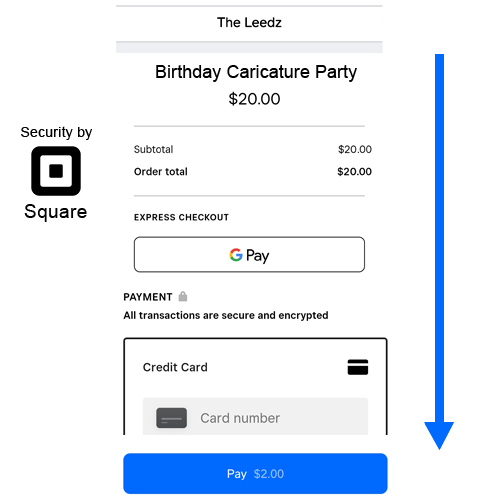
Click a leed to view its details. The seller may elect to hide some fields, such as the service location and the client's contact information — this information is revealed after purchase. Click the Buy button to go directly to Square for a secure checkout using your Square account or any credit / debit card. After checkout you will receive a receipt email with the full leed details. For more details on buying and sharing leedz, read the Leedz Terms of Service and Privacy policies.
Share a Leed
Forward a booking inquiry email to share@theleedz.com. AI extracts the trade, date, location, and client info. You get a confirmation email with an Edit Leed button. Or click Share Leed on your dashboard to create one manually.
By default, leedz are free and broadcast to all trade subscribers. Use the subject line to change that:
| price= | Set a price in dollars. Min $1.00, max $100.00. Requires Square. |
| share= | Control who gets the leed: * (broadcast), friends (your saved list), or specific emails. |
Keys are case-insensitive (PR=, price=, pr= all work). Fwd:/Re: prefixes are stripped. Unknown keys are ignored. Full reference: Share API
Get Paid
You already use Square to swipe cards at bookings. To sell leedz and get paid authorize Square with the Leedz. The Leedz subtracts a 9% service fee on top of the 3% Square fee from a leed's sale price. Sellers receive approximately 88% of the sale price deposited in their Square account.
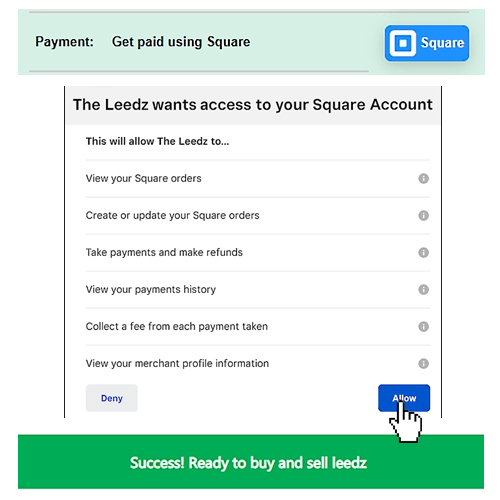
The Leedz uses Square as a fast, secure payment processor that works on all devices, and accepts all forms of payment including your Square account. The checkout experience, hosted by Square, makes it fast and easy to pay for a leed and have a receipt with the full booking details emailed to you.
Your Account
To access your dashboard, send an email to grow@theleedz.com from any email client. You will receive a magic link — click it to log in instantly. No passwords required. Your session lasts 30 days.
Your User Profile on the dashboard lets you tell other vendors about yourself and your business. Describe yourself in a way that encourages them to trust the leedz you post and want to buy them. Profile settings include:
- Name: Your display name shown to other vendors.
- Website: Link to your business site.
- About: A short description of your services.
- Zip Code & Search Radius: Limits leedz to a geographic area. Only opportunities within your radius will appear in your results.
- Trade Subscriptions: Choose which trades you want to follow. Subscriptions are additive — adding a new trade never removes your existing ones. You can also manage subscriptions by emailing find@theleedz.com with sb=TradeName in the subject, or by forwarding a booking to share@theleedz.com (auto-subscribes you to that trade).
In order to sell leedz and get paid you must Authorize Square. If you already use Square in your business, just log in and grant The Leedz permissions. Once authorized, proceeds from leedz you sell are deposited to your Square account. Click Remove to revoke your Square authorization and delete your Leedz account.
Edit a Leed
After sharing a leed, you can update its details from your dashboard or by clicking the Edit Leed button in your confirmation email. You can update the title, date, location, price, and client information. Fields can be shown or hidden from buyers — sellers should show just enough information to convince a buyer to purchase the leed, but not so much that the buyer can contact the client independently.
Unsold future leedz are editable. Leedz that have been sold or are in the past are shown in green on your dashboard and cannot be modified.
The Leedz is a community of trusted vendors. The integrity of the information provided depends upon the good-faith of its members. Any attempt to post incorrect leed information, or to mislead or misinform buyers in any way may result in removal of the leed info and/or deletion of the seller account. Always endeavor to post the most accurate, useful information possible and Report any leedz that appear otherwise.
Report a Leed
The Leedz relies upon the good-faith of its contributing members. When you post a leed with hidden fields, the buyer must use the information provided, their intuition, and your reputation as a seller in order to trust the booking enough to buy it. Buying a leed is no guarantee you make the sale, but the client contact info and address should be correct. The description and requirements should match the client's request. If you find a leed posted for sale that you don't trust, if it contains errors, looks incomplete, or does not provide sufficient information to purchase, Report it. Reporting a leed does not impact you in any way. Reporting a leed does not immediately remove it, but initiates a human review process which may result in doing so. These are the things to look for:
- No client Email / Phone Number Provided
- Fake Email / Phone Number
- No Details about the gig
- Suspicious Address
- Start/End Times inappropriate for requested trade
Privacy & Security
The Leedz uses 128-bit AES encryption to protect your data and leverages the secure infrastructure of Amazon Web Services and Square to process authentication and payments. Login is passwordless — you authenticate via magic link sent to your email, so there are no passwords to steal or forget. Sensitive information like your Square authorization is never sent over the network to users, and always stored in encrypted form. Your credit card is processed by Square. We never ask for your physical address, and the information shown in your User Profile is up to you. Any user can at any time request Leedz account deletion, which will revoke Square payment authorization for the app and remove all records of the user. For more details please read our Privacy and Security Policy document.
For Agents
The Leedz is built for AI agents. An agent acting on behalf of a vendor can discover gigs, create leedz, and manage subscriptions using email endpoints or the HTTP API. No API key is required — the sender's email address is the identity. A full OpenAPI spec is available at theleedz.com/openapi.json.
Email Endpoints
Agents interact with the platform by sending emails. Authentication is automatic via the sender address. Responses are HTML emails sent back to the sender.
| grow@theleedz.com | Login. Send any email to receive a magic link. Click it to access the dashboard. Session lasts 30 days. |
| find@theleedz.com | Find leedz. Receives available leedz matching the sender's subscriptions and location. Override search with subject-line parameters:
|
| share@theleedz.com | Share a leed. Forward a booking inquiry email. AI extracts the trade, date, location, and client info from the conversation. The sender becomes the leed creator. Price defaults to $0 — edit via the link in the confirmation email. The leed is broadcast to all subscribers of that trade. |
HTTP API
Public JSON endpoints — no authentication required:
| GET /getTrades | Returns all trade categories with current leed counts. Sorted by popularity. |
| GET /getStats | Returns platform-wide aggregate statistics. |
| GET /getLeedz?sb=DJ,MC | Search for leedz by trade subscriptions. Optional filters: st / et (start/end epoch ms), zp (zip), zr (radius miles). |
| GET /showUserPage?email= | View a vendor's public profile (returns HTML). |
Authenticated endpoints require a JWT session token via ?session=TOKEN. Obtain a token by sending an email to grow@theleedz.com or contact us for agent access.
Base URL: https://jjz8op6uy4.execute-api.us-west-2.amazonaws.com/Leedz_Stage_1
Contact Us
The Leedz is growing as fast as the gig economy.
We welcome small-business vendors to sign-up and start building a community of trusted peers working together to grow their businesses. We are looking for software developers and marketing professionals to join the Leedz, and investors wishing to help take it to the next level.
Contact us to:
|
theleedz.com@gmail.com
3 1 0 9 8 0 1 4 2 1 Instagram: @TheLeedz Facebook: Leedz Lyfe X: @LeedzLyfe |